Short answer
PDKS is a system that records employees' clock-in and clock-out times by card, fingerprint, face or mobile app. For the right choice, the number of employees, the shift pattern, the number of branches and data transfer to the payroll software are assessed together. If a biometric reader will be used, get legal advice on KVKK compliance.
What is PDKS for?
A time and attendance system replaces the paper signature sheet or the timesheet kept by hand. The employee taps a card on the reader or shows their face at entry and exit; the device records the time. The software compares these records with the shift plan and produces reports on late arrivals, early departures, overtime and absences.
For a business, the real gain is fewer hours spent preparing the timesheet at month end. Instead of collecting records one by one, the HR or accounting officer gets a ready-made table from the software. When employees can also see their own clock-in and clock-out times, objections and arguments decrease.
PDKS also makes leave tracking easier. Once annual leave, sick leave and excused leave are entered in the software, an employee who never came to the reader that day shows up as on leave, not absent. At month end the manager can see who used how much leave without keeping a separate table. In a small business this difference is a few hours; in a crowded factory it is days.
The difference between PDKS and access control
Access control manages who can open which door. PDKS records who comes to and leaves work and when. The two systems can use the same hardware: the turnstile or door reader at the entrance both opens the door and sends the time to the PDKS software.
If only PDKS is being installed, the reader is mounted on the wall and controls no door; employees tap as they walk past. This is the simplest setup. If door control is also wanted, the reader is connected to the lock or the turnstile. Planning both needs together from the start is healthier than installing two separate systems and trying to move data between them. At a turnstile entrance, no record is created until the employee passes through, so tapping and walking back or tapping for someone else also becomes harder.
Choosing the reading method
The structure of the workplace determines the reading method. A team working in an office and a team working at a construction site or in a field do not use the same device.
The conditions where the device will be placed also affect the choice. A reader at a factory entrance or in the open air must withstand dust, humidity and summer heat; the protection class of these devices is stated in the catalog. If the sun hits the camera of the face recognition device directly, recognition gets harder, so the device is moved under an eave or to a spot closer to the indoors. Inside an office, it is enough for the device to be visible, easy to reach and within the angle of the camera recording.
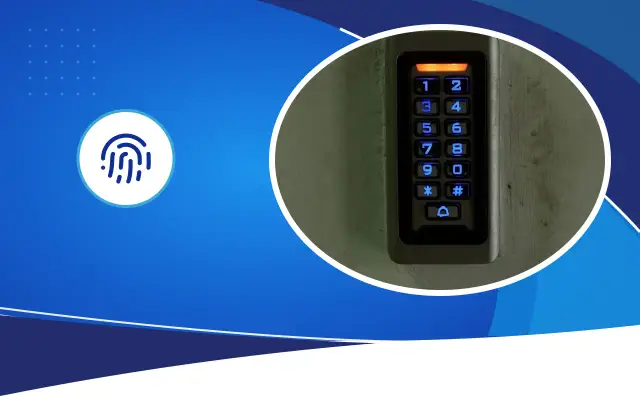
- Card: cheap and fast. An employee can have someone else tap their card; this is called buddy punching.
- Fingerprint: tied to the person. Reading can become harder for staff who wash their hands often or work with dust or chemicals.
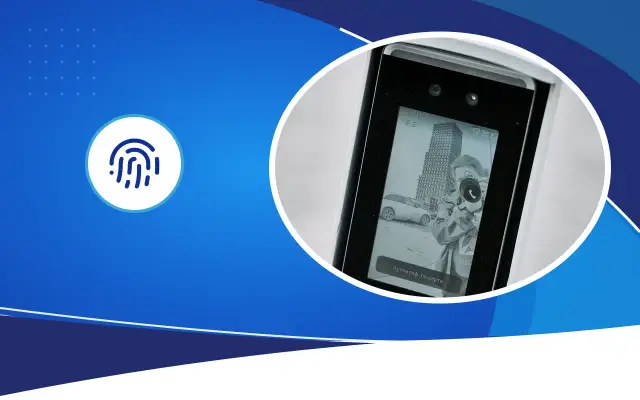
- Face recognition: contactless, practical in places where people work with gloves or dirty hands. Light and camera angle must be adjusted.
- Mobile app and location: suitable for field staff. The phone needs location permission and an internet connection.
- Combined: card and face together on the same device; it gives the employee the option to choose the method.
Expert note: Place the reader with the busy entry time in mind. If dozens of people queue at the same device at shift change, the recorded times do not reflect reality. If needed, put in two readers.
- 1List the employees and the shift structure
- 2Choose the reading method
- 3Decide the reader locations
- 4Define the shift rules
- 5Test the payroll transfer
- 6Prepare the KVKK documents
Shifts, overtime and the payroll link
The strength of PDKS software is measured by how flexibly you can define the rules. An office with fixed hours and a factory with three shifts do not work with the same settings. The software should be able to define shift templates, night shifts that cross the day boundary, break times, tolerance minutes and public holidays.
Overtime is calculated according to the Labor Law and employment contracts. PDKS makes this calculation easier, but you have to define the rules. To make sure the rules are set up in line with the legislation, work with your accountant or a labor law specialist.
Data transfer to the payroll program should be discussed separately. Can the software export the timesheet in a format the payroll program can read, or will the data be moved by hand? If this question is not settled before installation, the time PDKS saves is lost in data transfer at month end. For a trial, comparing one month's data using both methods shows the errors before going live.
Businesses with branches and cloud software
For businesses with more than one branch, the records of the device at each branch have to be brought to the head office. Cloud-based software does this on its own over the internet; the manager at the head office sees all branches on one screen. With local-server solutions, a secure network connection must be set up between branches.
For a business with a store in central Şanlıurfa and a branch in Siverek or Viranşehir, a cloud solution simplifies the installation. When the internet goes down, the device should keep the records in its own memory and send them when the connection returns; ask about this feature before buying.
What to watch for under KVKK
Clock-in and clock-out records are personal data. Fingerprint and face data are counted as special-category personal data under Law No. 6698, and their processing is subject to stricter conditions. In the decisions the Personal Data Protection Authority has published on this subject, the question of whether the same purpose can be reached with a less intrusive method such as a card comes to the fore.
That is why we recommend getting an opinion from a legal advisor before installing biometric PDKS. Giving employees a privacy notice, setting the retention period of the data and protecting the data on the device and server are also part of the process. On the technical side, ask the installer to confirm that biometric data is kept as an encrypted template, not as an image.
Questions to ask when choosing
The price of PDKS varies with the number and type of devices, the software's license model (one-time or monthly), the number of branches and the installation work. When asking for a quote, ask these questions: can the software define your shift pattern, how is the payroll transfer done, are records lost when the internet goes down, and where does service come from when a device fails?
Desa Bilişim installs PDKS and access control for businesses in Şanlıurfa. If you share your number of employees and your shift pattern, we can choose the right device and software together.
Frequently asked
Is it mandatory to install PDKS?
There is no general obligation to install PDKS, but employers do have obligations to keep records of working hours. PDKS is a practical way to keep these records in order. For obligations specific to your business, consult your accountant.
Fingerprint PDKS or card PDKS?
A fingerprint prevents clocking in for someone else, but under KVKK it means processing special-category data. A card brings less data burden but can be shared. Before choosing, it is recommended that you get legal advice and consider offering employees a choice.
Can PDKS be used for staff who work in the field?
Yes. Clock-in and clock-out with location verification through a mobile app, or portable devices installed at the site, can be used. Keep in mind that location data is also personal data and should be collected only during working hours.
Let's choose the right PDKS for your business together
Share your number of employees and your shift pattern, and we will prepare a written quote for the devices and software.