Short answer
In a tidy network cabinet, devices are arranged in a logical order, there are cable organizers between the distribution panels and the switches, and every connection is made with short patch cables of the right length. Every port and every cable is labeled with the same number at both ends. The cabinet's ventilation, the UPS connection and an up-to-date list showing which port goes where complete the order.
Why does a cabinet get messy?
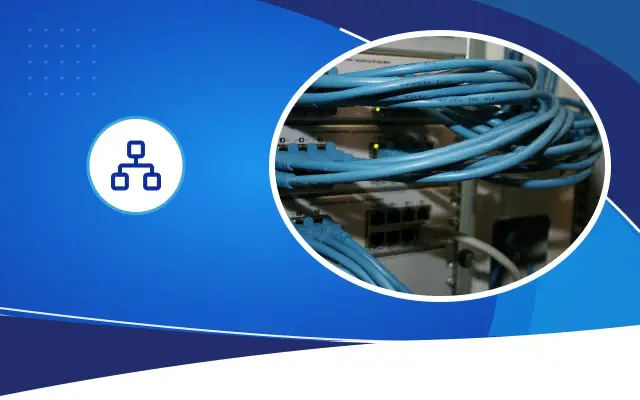
No cabinet is installed messy; it becomes messy over time. A new camera, a new printer, a new line is added to a cabinet that was tidy at first installation every year. In an urgent fault, the longest patch cable at hand is plugged in and nobody labels it. A few years later, the front of the cabinet turns into a tangle where nobody knows which cable goes where.
The cost of this mess shows up at the moment of a fault. If you do not know which port to check when the accounting computer loses its connection, a five-minute job stretches to an hour. When you pull the wrong cable, you unknowingly cut off a camera or the register computer. A tangle of cables also blocks airflow and heats up the devices.
In what order are devices arranged?
Cabinet height is measured in U units; each device takes up one or several U. There is no single right order, but there is a common and practical layout.
The incoming lines (fiber termination box, service provider modem) go at the top. Below them, patch panels and switches are arranged with a cable organizer between each. Placing the panel and the switch one under the other keeps the patch cables between them short. Heavy and heat-producing devices such as the router or firewall and the camera recorder are placed on shelves, in the middle and lower section. The UPS goes at the very bottom; because it is heavy, it also keeps the cabinet balanced.
Always leave empty U in the cabinet. A completely full cabinet means rearranging whenever a new switch needs to be added.
When buying a cabinet, look at depth as well as height. Shallow wall-mounted cabinets are enough for a panel and a small switch, but a camera recorder or a rack-mount UPS may not fit in these cabinets. Finding out the size of the recorder and the UPS beforehand and choosing the cabinet accordingly prevents the device from sticking out in front so the door cannot close. Leaving enough room to work at the front and back of the cabinet also makes maintenance easier.
Patch cable length and cable management
The most overlooked part of cabinet order is patch cable length. If you plug a 2-meter cable between the panel and the switch right below it, the excess hangs in front of the cabinet. Stocking cables in short lengths (from a few tens of centimeters to one meter) solves this problem.
Tying cables tightly with cable ties is a common habit but a harmful one. Hard ties crush the cable, and later all of them have to be cut to remove one cable. Hook-and-loop (velcro) straps are both gentle and reusable. Cables should run down through the vertical channels on the sides of the cabinet and should not cover the front of the devices or the ventilation openings.
Expert note: Use a color scheme for patch cables and write the meaning of the colors on the cabinet door. For example, you can choose one color for cameras, another for access points and a third for critical server connections.
- Panel and switch one under the other
- Cable organizer in between
- Patch cables of the right length
- Hook-and-loop straps used
- Outlet and port numbers match
- Color scheme written on the door
- Fan and temperature control in place
- Devices powered through a UPS
- Port list is up to date
Labeling: what and how?
A good label tells you where a cable goes without following it from the cabinet to the wall outlet. Consistency in labeling matters more than the label itself. Choose a coding that includes building, floor, room and outlet number, and use the same one everywhere. The international TIA-606 standard offers a framework for this; for a small business, a simple and consistent system is enough.
- The wall outlet and the port on the panel should carry the same number.
- Both ends of the cable in the wall should be labeled.
- Both ends of a patch cable should show the switch port it connects to.
- The switches and panels themselves should also be given a name.
- Labels should be printed with a label maker, not written by hand; a handwritten label becomes unreadable in a few years.
- Unused cables inside the cabinet should also be marked as 'empty'.
Ventilation, power and grounding
Switches, PoE power supplies, recorders and UPS units produce heat. In a closed cabinet this heat builds up. Fitting a fan unit at the top of the cabinet expels the hot air. The ventilation holes in the cabinet door and side panels must not be covered, and the cabinet should not be pushed completely against the wall. In a Şanlıurfa summer we often see temperatures approaching the devices' operating limits in cabinets in air-conditioning-free storerooms or under staircases; in such places, putting a temperature sensor inside the cabinet gives an early warning.
The cabinet should be connected to a power outlet line fed from a separate fuse, and to grounding. All active devices should be powered through a UPS. Inside the cabinet, a panel-mounted power strip should be used as the multi-outlet, not household-type extension cords.
Documentation and rules to keep the order
A cabinet is tidied once, but rules keep the order. Put the port list on the cabinet door or in a file near it: which panel port is connected to which room and which switch port, which VLAN that port is in, and what device is at the other end. A digital copy of this list should also be held by the IT person in charge and by the company providing support.
It should be clear who may work on the cabinet, and the cabinet should be kept locked. Every change made should be entered in the list the same day. Opening the cabinet once a year to dust it, check the fans and remove unused cables prevents the order from breaking down.
Tidying a messy cabinet is often done outside working hours, with a planned interruption. First a photo and a list of the existing connections are made, then the cables are unplugged one by one, labeled and plugged back in. In systems it has installed or taken over, Desa Bilişim hands this work over together with the port list.
Frequently asked
Does the internet go down while the cabinet is being tidied?
Because cables are unplugged and plugged back one by one, there are short interruptions. That is why the tidying is done during hours when the business is closed, with the connections listed beforehand.
Is a cabinet needed in a small shop too?
A big cabinet is not needed for a few devices. A small wall-mounted cabinet protects the modem, switch and recorder from dust and unauthorized access. What matters is that the devices are not left in the open, scattered under the counter.
Cable ties or hook-and-loop straps?
Hook-and-loop straps are preferred inside the cabinet. They do not crush the cable, and when one cable is added or removed, the others do not have to be cut.
Let's tidy your cabinet together
Share a photo of your cabinet, and let's draw up a plan for organizing and labeling it.